
How to Put Images in a Janitor AI First Message (And Why It Can't Generate Them)
Insights | Updated on June 12, 2026
By Lizzie Od, Editor & AI Roleplay Enthusiast
 Ask AI for a summary


TL;DR:
- The syntax: to put images in a Janitor AI first message, paste the markdown image embed into the message box using the direct image link — no spaces between the
!, the brackets, and the parentheses. - The reliable route now: upload the image to your own Janitor Media Library first, then embed that link. External hosts like imgur and catbox often render as a plain clickable link as of late 2025.
- The honest answer: no, Janitor AI cannot generate images. It never has, and the developers turned down the feature — so every picture has to come from somewhere else first, which is why some readers look at Janitor AI alternatives that can generate images.
- Want the character itself to come alive? You can import the same character card (the .png/.json you already have) at ourdream.ai/character-import to actually generate images and video of it.
Janitor AI's image situation confuses people for a reason that's almost funny once you see it: two true things sit right next to each other and contradict each other. You can show an image inside a Janitor chat. Janitor can't make one for you. People land on the same page asking both questions — how do I get a picture in here, and can this thing draw my character — and most guides only answer one half, usually after four paragraphs about what Janitor AI is.
We will skip all that. Once the embed-versus-generate split clicks, the rest is easy. You'll know the exact syntax to drop a picture into your intro message, why it sometimes breaks, and where to go if the character itself is what you're after — not just a borrowed photo.
How Do I Put an Image in a Janitor AI First Message?
To put an image in a Janitor AI first message, paste the markdown image embed into the message box using the direct image link — with no spaces between the !, the brackets, and the parentheses. That's the whole trick. Everything else is just getting a usable link.
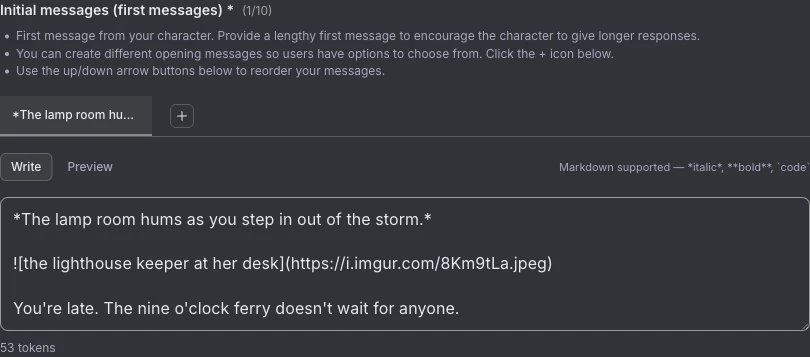
The most reliable way to do it right now is to host the image inside Janitor itself. Through late 2025, the community on r/JanitorAI_Official has reported that images uploaded to your own Media Library (“My media”) render inline far more consistently than links from outside hosts. So start there.
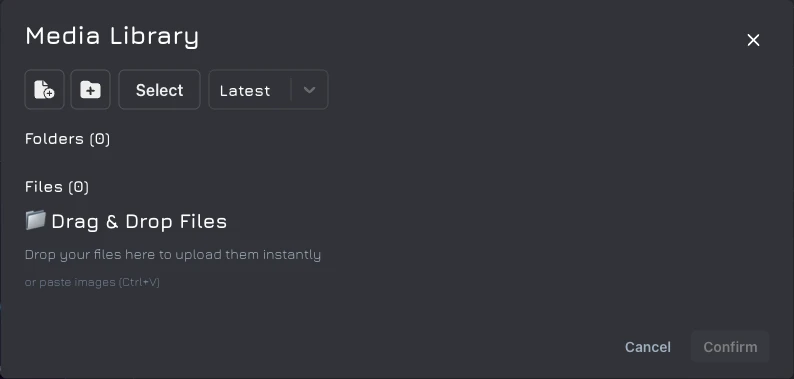
- Get a direct image link. The dependable route: open your Media Library, upload the image, and copy the
media-approvedURL Janitor hands back (it looks likehttps://ella.janitorai.com/media-approved/...). The classic route: host it on imgur or catbox.moe and copy the direct file link — see the caveat below for which one to trust. - Type the markdown. In the editor, write the image embed with your link inside the parentheses. Want alt text? It goes in the brackets.
- Save or send. The image renders inline at the top of the first message.
Here's the part that trips everyone up — the link has to point at the file itself, not the page it lives on:
✅ correct: 
❌ wrong: The first ends in .jpg, so it's the actual image. The second is the imgur gallery page, and Janitor cannot draw a webpage into your chat. If you only ever remember one thing, remember that the URL should end in .jpg, .png, or .gif.
One advanced note: an HTML image tag works too, and it's what you'd reach for if you wanted to control sizing or positioning — Janitor's own Code Collection help docs spell out the tag format. For a plain inline image, markdown is simpler, and there's no reason to overthink it. Curious how cards and their fields actually fit together? Our character cards guide walks through the whole anatomy. For the markdown syntax itself, the CommonMark image spec is the authoritative reference.
External Host vs. Media Library — Which Link Renders Inline?
Both routes still work, and which one you pick comes down to how new your setup is. Here they are side by side, equal weight, your call.
- Route A — Media Library upload (the safe bet now). Upload the image to your own Janitor Media Library and embed the
media-approvedURL it gives you. On current setups, this is the route that reliably shows up inline. - Route B — External-host markdown. Host the image on imgur or catbox.moe, copy the direct image URL (it ends in
.jpg/.png/.gif), and embed it with no spaces. Plenty of people prefer catbox.moe here — it's simpler and tends to be more reliable than imgur.
The caveat worth knowing before you pick: community testing through late 2025 reports that external-host links increasingly turn into a plain clickable link rather than an inline image, and that on many setups only images uploaded to your own Media Library still appear in-chat. Janitor never published a changelog about this, so treat it as community-observed behavior, not stated policy. The practical read is simple. External hosting is faster if your setup still renders it; the Media Library is the safe bet if yours does not.
How Do I Send or Add Images in an Ongoing Chat or Set a Background?
You add images to an ongoing Janitor AI chat exactly the way you do a first message — by embedding the same markdown image link in your own message, with the same no-spaces rule, mid-roleplay or otherwise. Janitor does not treat the opening message as special. If the syntax works at the top, it works on message forty.
One thing to be clear about, because it's the question lurking underneath: the bot can't send you an image on its own. When it looks like it did, it pulled an existing link out of its own definition or greeting, or routed your request to an outside service — it didn't draw anything. (The honest, complete answer to “can it generate” is two sections down.)
Backgrounds are a different mechanism entirely. You don't embed those in a message — you set them through a dedicated “change background image” control in the profile or character editor, where you can also fiddle with blur and opacity after uploading. Comfortable in the profile code editor? You can do it with CSS instead: background-image: url('LINK'). Same direct-link rule, same trap — a page URL won't work here either.
Why Is My Image Not Loading or Showing as a Clickable Link?
If your Janitor AI image shows as a clickable link instead of appearing inline, the cause is almost always one of four things — and each has a quick fix. The classic symptom, in people's own words: “I only see a clickable link. Clicking it opens the image.” Annoying, but fixable.
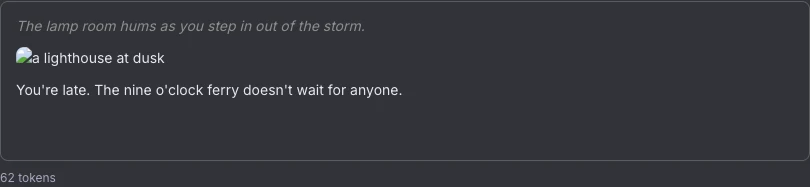
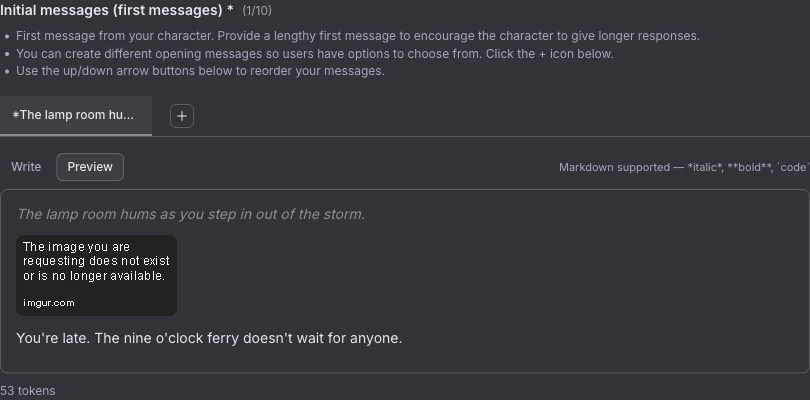
Start with the side-by-side, because the difference that breaks an embed is often a single character you can't see:
❌ ! [Png] (url) → renders as a bare link (note the spaces)
✅  → renders the image inline
❌  → bare link (page URL, not the file)
✅  → renders the image inlineNow the four causes, in the order they actually happen:
- Spaces inside the syntax. This is the number-one offender. There can be no space between the
!, the brackets, and the parentheses. Someone who debugged it put it plainly on the subreddit: keep the pieces together, don't split them. Delete the spaces and it loads. - A page URL instead of the direct file. If your link ends in something like
/dS7vnhFrather than.jpgor.png, you grabbed the gallery page. Right-click the image and choose “Copy Image Address” so the link ends in the file extension. - The host now renders as a link only. This is the late-2025 shift — external-host links that worked fine a year ago increasingly come through as a plain link. The fix is to stop fighting it: upload the image to your Media Library and embed that
media-approvedURL instead. - A dead or expired host link. This is the “why did it work yesterday and not today” one. Some hosts purge images, and temporary uploads expire — the link rots, and your inline image becomes a broken nothing. Re-host the file somewhere durable and re-embed it.
There's a softer thread in the community tying the external-link tightening to payment-processor pressure around NSFW hosts. Plausible, sure — but it's interpretation, not anything Janitor has confirmed, so do not bank on it. For practical purposes, the Media Library route sidesteps the whole question.
Can I Put Images in My Janitor AI First Message on Mobile?
Yes, you can put an image in your Janitor AI first message on mobile — the syntax is identical, you just grab the direct link a little differently. No app does the work for you, but the steps are short.
- Copy the direct link. Long-press the image until “open in new tab” appears, then long-press again to copy the link. That copied address is your direct image URL.
- Open the markdown. Start your message with
!immediately followed by a bracket description — no space between the!and the[. - Add the URL. Drop the link in parentheses right after the brackets, so the finished line points straight at the image file.
Two small things people on mobile hit. The app runs in Safe Mode until you flip on “Enable NSFW for App” in the web settings — do that first if your image needs it, or it won't show. And the Media Library route works on phones too, so if your inline images keep collapsing into links, that's still the more dependable path on mobile.
Can Janitor AI Generate Images?
No — Janitor AI cannot generate images. It never has, and the developers have said they have no intention of adding the feature, so any picture has to come from somewhere else first. That's the flat answer the second half of your search was looking for, and it's the standing answer on r/JanitorAI_Official every time someone asks.
As for why: the community on r/JanitorAI_Official has consistently explained the rejection as a cost decision — image generation would pile on GPU and server expense the platform chose not to take on. (Worth flagging that this is the subreddit's standing explanation rather than a quote from a named developer, so take the specific reasoning as community consensus, not an official memo.) The capability itself, though — no native generation — is confirmed across thread after thread.
Ever seen a bot “generate” a picture and done a double-take? Here's what really happened: it pulled an existing image link out of its definition or greeting, or it routed to an outside service like Pollinations. The JLLM and proxy models running your chat cannot create images, and — this is the part that matters for getting your character drawn — they can't even “see” your character to begin with.
So the manual route is to generate elsewhere and paste the direct link back in. The usual tools:
Here's the structural catch, and it's the one nobody mentions: none of these tools can read your character's stored description. You hand-translate the text profile into a prompt yourself, and you re-prompt from scratch for every single image — so the face drifts, the outfit changes, and the exact character you built never quite shows up twice. That's the dead end the next section is about.
How Do I Actually Generate Images or Video of That Exact Character?
The practical route, if generating images or video of that exact character is the goal, is to take the character card you already have and import it somewhere that can generate from it. Janitor structurally will not, and the generators above can't reproduce your character — so the move is to bring the card itself to a platform built to draw from it.
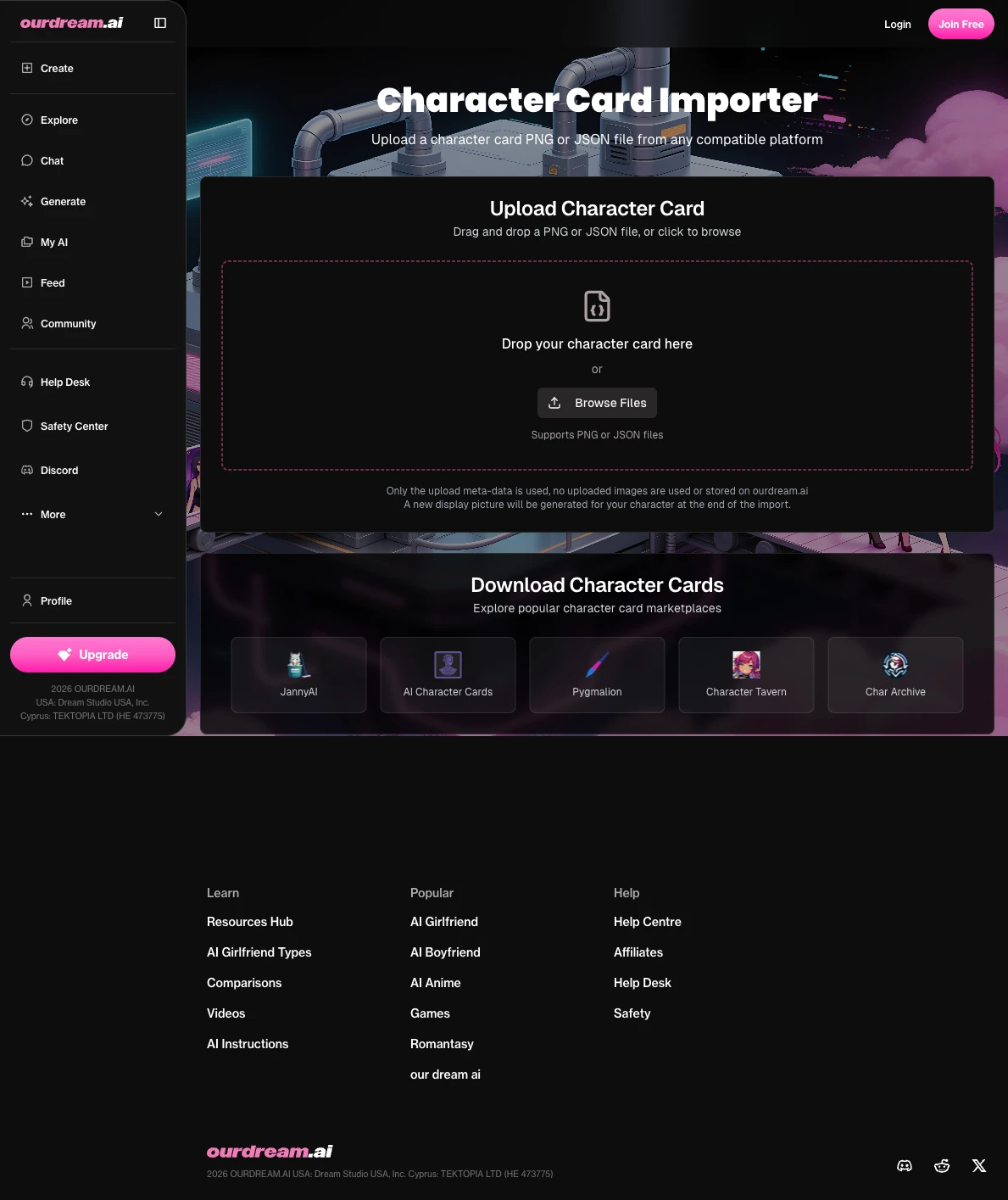
That's what ourdream.ai does with imported cards. You can import the same Janitor character card — exported as a PNG or JSON — at ourdream.ai/character-import; the page parses the card, AI-detects gender, auto-fills the appearance, and loads the character into the builder, where it can generate images, video, and NSFW of that exact character with no NSFW restrictions (it draws a firm line at minors and real-person lookalikes). The supported formats are broad — PNG cards from SillyTavern and Ginger, plus JSON from Tavern, Faraday, Pygmalion, Character.AI exports, Agnaistic, and TextGen WebUI — and a Janitor card saved as .png or .json lands inside that list.
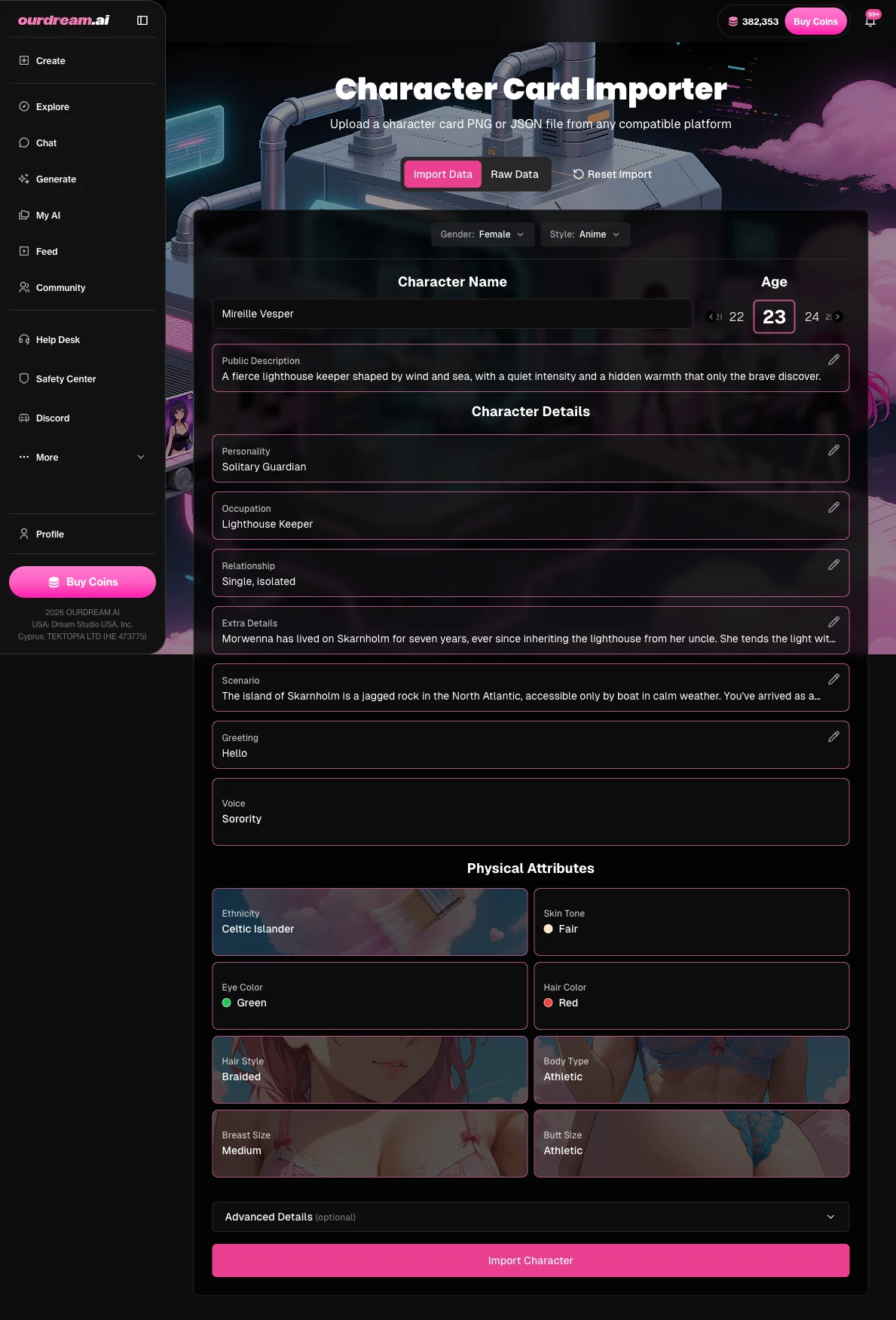
ourdream.ai's published metrics put it at over 208 million images generated by 31 million people, so the generation side is well past proof-of-concept. The honest trade-offs: it's a separate site, so you're leaving Janitor for it, and generation runs on dreamcoins — the free tier is a one-time 55-dreamcoin allotment (5 per image), not an ongoing free faucet, so heavy generating means a paid plan. What you get for that is the thing Janitor won't do. The card you already built stops being text-only and becomes a character you can actually watch move.
Does the Image Count Against Tokens, and Will It Get Flagged?
An embedded image is just a markdown link sitting in your message text, so it doesn't carry a separate image-token cost the way a generated asset would — and yes, it's still subject to Janitor's moderation rules. Media Library uploads get pre-moderated before they're usable, and Janitor's TOS bars minors, real-person lookalikes, and some gore or nudity depending on the model. Keep it within those lines and you're fine; the FAQ below has the edge cases.
FAQ
Can Janitor AI generate images of my character?
→
No. Janitor AI has no native image generation, and the developers rejected the feature — every picture has to be made somewhere else and embedded as a link. Worse, the external generators you'd use cannot access your character's stored description, so they can't reliably reproduce that exact character; you'd be re-prompting and hoping for consistency each time. When generating your specific character is the goal, you need a platform that reads the card itself, not a generic image tool.
Why is my image showing as a clickable link instead of appearing inline?
→
That symptom usually traces to one of three things. Most often it's spaces inside the syntax — adding spaces between the exclamation mark, the brackets, and the parentheses breaks it, while keeping them together works. Sometimes it's a page URL instead of a direct file link (the address needs to end in .jpg, .png, or .gif). And since late 2025, external-host links increasingly render as links only, with the Media Library route being the reliable fix.
Can I add images to ongoing chat messages, or only the first message?
→
Both. The same markdown image syntax works in any message you send, not just the opening one — the bot still can't send an image on its own, though.
Can I do this on mobile?
→
Yep. One wrinkle: you grab the direct link by long-pressing the image, opening it in a new tab, and copying that address, and then it’s the same markdown syntax you’d use on desktop. If your image needs to be NSFW, switch on "Enable NSFW for App" in the web settings first.
Will my embedded image get moderation-flagged?
→
Media Library images are pre-moderated before you can use them, and Janitor's TOS prohibits minors and real-person lookalikes outright. Stay inside those rules and a normal embed will not trip anything.
Does the image count against tokens, and does it support GIFs or video?
→
It's link text in your message, not a generated asset, so there's no separate image-token cost. GIFs embed through the exact same markdown syntax; video support is limited and depends heavily on the host, so don't count on a clip behaving like a still image.
Final Thoughts
Once the embed-versus-generate split clicks, the whole thing gets simple. You know precisely where the syntax goes, why it occasionally breaks, and how to fix it in one character's worth of editing — and the honest limit is freeing, not frustrating, because it tells you exactly where to stop trying and where to go instead. Janitor will happily show a picture you bring it. It just will not make one. The character you built deserves to actually come alive in images and video, and that part lives elsewhere — on a platform that reads the card instead of guessing at it. Janitor shows; it doesn't make. The trick is knowing which job you're asking of which tool.
Related Articles
Browse All →
ourdream vs candy.ai
sweeter than candy?
Read full article →
ourdream vs GirlfriendGPT
Which AI companion actually remembers you?
Read full article →
ourdream vs JuicyChat
Comparing content freedom and image quality.
Read full article →
ourdream vs SpicyChat
How does SpicyChat stack up against ourdream?
Read full article →