
Best Character Card Creators & Editors in 2026: We Built the Same Card in Each Editor to See Which Ones Export Clean
Insights | Updated on June 12, 2026
By Lizzie Od, Editor & AI Roleplay Enthusiast

 Ask AI for a summary


TL;DR:
- The best character card creator depends on the job. To use a card the moment it's made — image, video, and chat on one character — ourdream.ai is the build-and-run pick. To edit fields by hand and walk away with a clean portable file, the avakson fork of ZoltanAI or AICharED are the editors to open.
- ZoltanAI's original site is dead —
zoltanai.github.io/character-editorreturns a 404. Use avakson.github.io/character-editor instead. - For the AI-writes-the-fields route, Backyard's Triple-C drafts free paste-ready text and the custom ChatGPT GPT hands you an importable file.
- We built the same character in each editor, exported it, and inspected the file to see exactly what survived.
Google ranks ten things for “character card creator,” and two of them aren't even roleplay tools — they're a Magic: The Gathering card maker and an image generator that paints a picture, not a card. Of the tools that are on-topic, the single most-searched editor, ZoltanAI, spent stretches of 2025 returning a “Site not found” 404, and nobody on the first page bothers to tell you which mirror still works.
So you get a search result that names tools without sorting them. It lists editors without saying which ones still run. And it never once explains that “make a card” and “use a card” are two completely different jobs.
So we did the sorting. There are really three things people mean when they say “character card creator,” and the SERP smears them into one undifferentiated pile: manual editors (you type the fields, you get a clean portable file), AI generators (a model drafts the fields for you), and build-and-run platforms (the card becomes a living character that actually generates image, video and chat). We took a single test character — Mireille Vesper, a Skarnholm lighthouse keeper — built her in each editor, exported the file, and read what came out the other side. This is the roundup that names which tools are alive in 2026, which export clean, and which one you reach for depending on whether you want a file or a character.
What's the Best Character Card Creator Overall in 2026?
The best character card creator overall in 2026 depends on the job you're doing — but for actually using the character once it's built, ourdream.ai is our top pick, and we'll sort the rest into the three jobs the SERP refuses to separate. Need a portable file to carry into SillyTavern and nothing more? A dedicated manual editor wins. Want a model to write the personality for you? An AI generator wins. Want the card to come alive — to generate images, video and chat on the exact character you imported? That's a different category entirely, and almost nothing in the search results is honest about the difference.
Here's the taxonomy, because it exists nowhere else on this SERP. Manual editors are the field-by-field tools: you fill in name, description, personality, scenario, first message, and example dialogue, and you walk away with a V2 PNG or JSON file. AI generators flip that — you give a one-line idea and a model drafts the fields, which you then paste into an editor or import as a file. Build-and-run platforms skip the “now what?” entirely. The card isn't a download. It's a character you can immediately watch move.
Most rankings treat all nine of these tools as interchangeable. They aren't. A card maker who wants a clean SillyTavern-ready PNG has a completely different need from someone who wants the model to ghostwrite a persona — who has a different need again from someone who just wants to talk to the character they dreamed up. We'll go through all three jobs, name the live tools in each, and — because the field is littered with dead links and aging forks — flag exactly which ones still work.
How Do the Character Card Creators & Editors Compare at a Glance?
Here's how the nine tools compare at a glance — what each one makes, what file it exports, and whether it's still alive in 2026. The SERP has no comparison table anywhere, which is strange for a query this obviously comparison-shaped, so this is the one place you can see the whole field laid out side by side.
One caveat the table can't hold: “alive” isn't the same as “exports clean.” So which of these actually wrote a clean file when we ran a character through it?
What Makes ourdream.ai the Best Build-and-Run Pick for a Character Card?
What makes ourdream.ai the best build-and-run pick is that it's the only tool here where your card doesn't just export — it starts generating image, video and chat with no NSFW restrictions, the moment it's imported or built. Every other tool on this list hands you a file. ourdream.ai is the one place where the file becomes a character you can actually watch move.
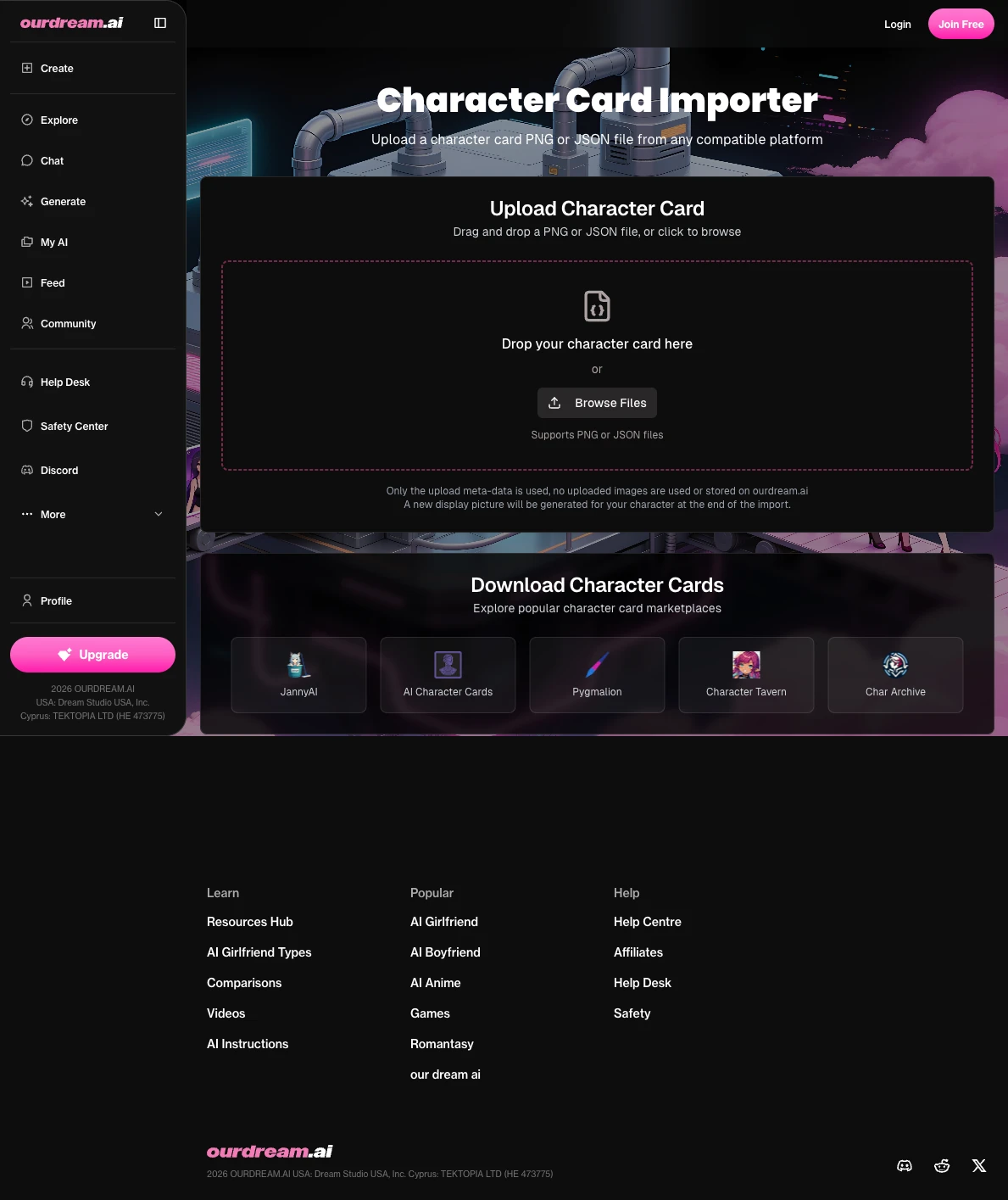
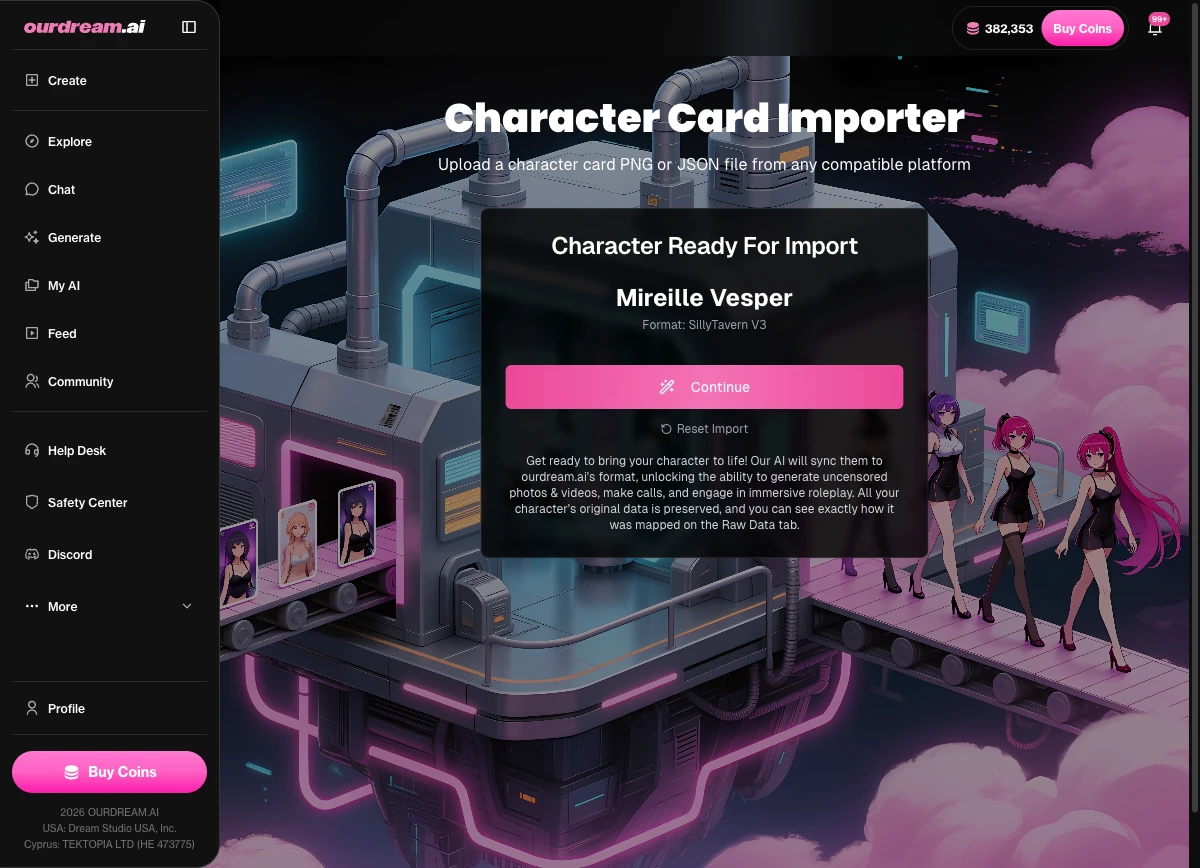
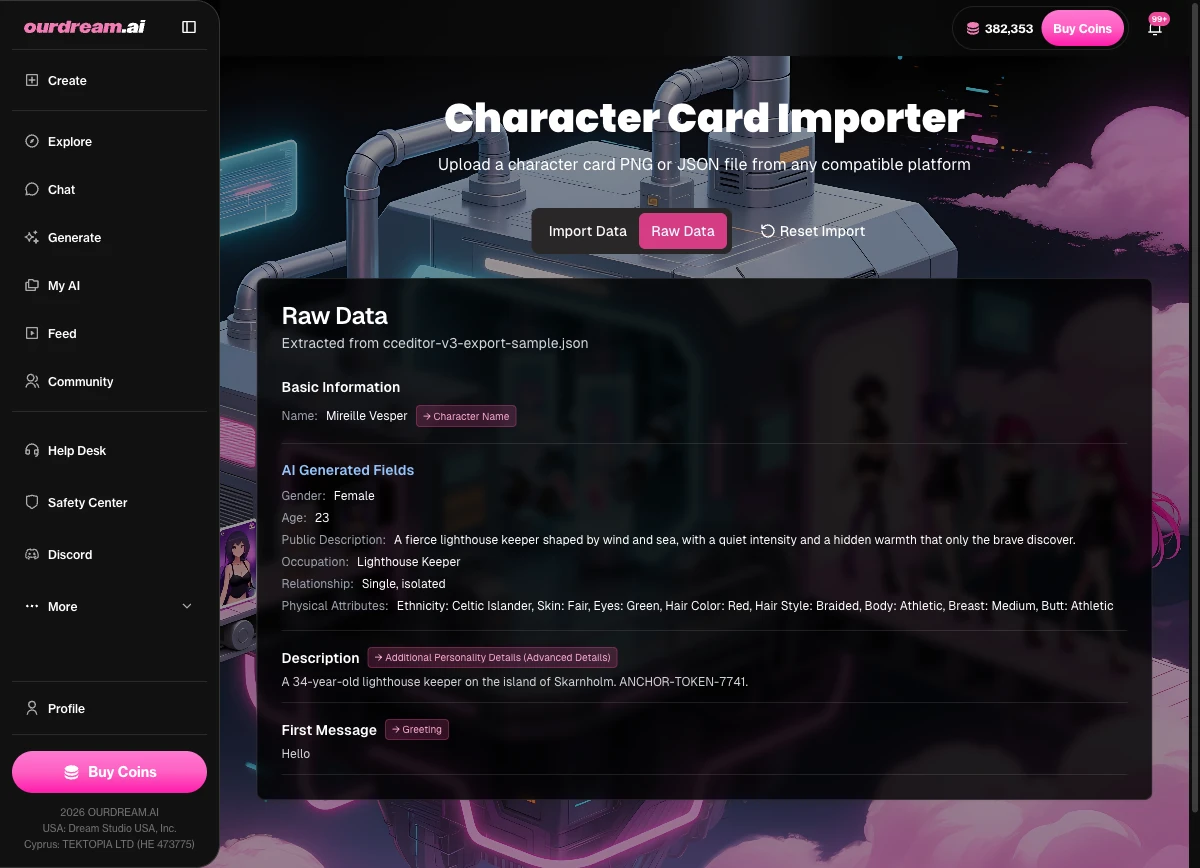
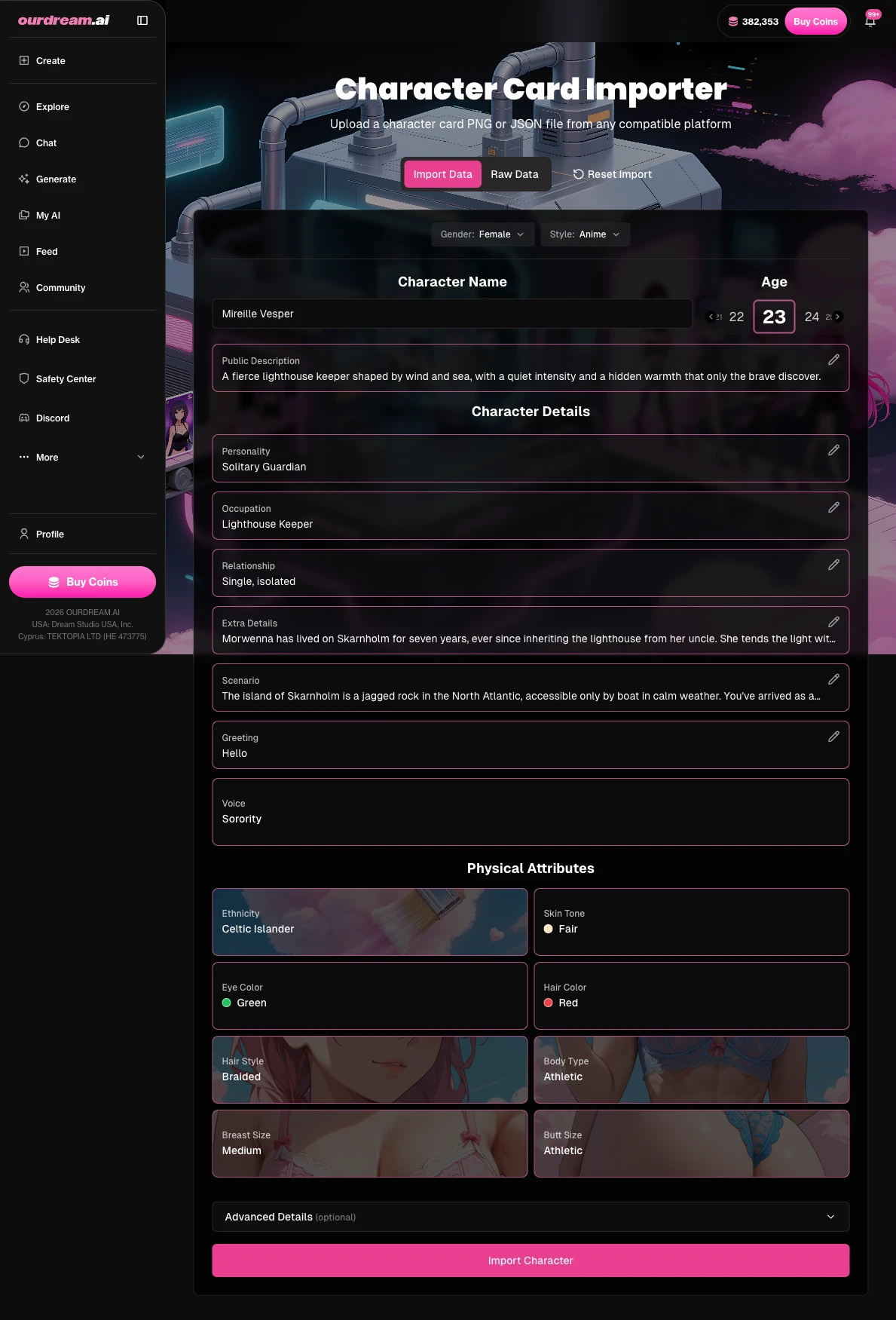
Start from scratch and you go through a six-step creator with real depth: you shape appearance, then pick from 46 personality traits, 18 voices (14 female and 4 male), and 135 occupations, and write a backstory in a narrative field that runs up to 100,000 characters. That is not a “name and a blurb” card. That is room for an actual character. The more interesting trick, though, is the import side, because ourdream.ai's importer is the broadest in the category. It reads PNG cards (SillyTavern V2 in the chara chunk, V3 in the ccv3 chunk, and Ginger) and it reads JSON cards (Tavern V2/V3, Faraday V4 with its lorebook, Pygmalion and Character.AI exports, Agnaistic with memory books, and TextGen WebUI). On import it AI-detects gender, auto-fills appearance, and converts the lorebook into a character_book.
Here's the concrete version of why that matters. Take an existing SillyTavern V2 PNG — the kind that sits as inert text in most front-ends — and import it at ourdream.ai/character-import. It loads clean, the appearance auto-fills from the description, the lorebook converts to a character_book, and then it immediately generates an image of that exact character. That is the build-and-run difference in one move: the import step doubles as the on-ramp. A four-layer memory system (Auto Memory Log, Pinned Memories, Custom Instructions, and User Personas) is what keeps that character consistent once you start talking to it, so the continuity you wrote into the backstory actually holds across a session.
Now the honest part. ourdream.ai is not a portable-PNG exporter. If your specific need is a loose V2 PNG to carry into someone else's front-end, this is the wrong tool — reach for a dedicated editor like the avakson fork or AICharED instead. ourdream.ai is for “make a character you can actually use,” not “produce a file for another app.” (It also won't import arbitrary WEBP card containers — only the formats listed above.) For context on the scale here, ourdream.ai's published platform metrics show over 38 million AI characters created on the platform and 5 million people generating images every month — the kind of usage that only makes sense if the cards are actually being run, not just filed.
Pros:
- The broadest card-import list in the category — PNG and JSON, V2 and V3, lorebooks and memory books
- Build-and-run: image, video and chat on the same character, with no NSFW restrictions
- A genuinely deep six-step creator (46 traits, 18 voices, 135 occupations, 100k-char backstory)
- Memory that carries, so the character stays consistent across a session
Cons:
- Not a portable-PNG exporter — you cannot pull a loose file out for another front-end
- Build-and-run means you live inside ourdream.ai, not in a standalone file tool
Key Features: ourdream.ai's real trick is that the import step is also the on-ramp — the same .png that just sits as text everywhere else starts generating here.
To maximize your experience: If you're importing, bring the JSON with the lorebook intact (Faraday V4 or Agnaistic) rather than a bare PNG — the memory book converts to a character_book and your character remembers more from message one.
Which Card Formats Can ourdream.ai Import?
For the reader who has a specific file in hand, here's the import list at a glance:
- PNG: SillyTavern V2 (
chara), SillyTavern V3 (ccv3), Ginger. - JSON: Tavern V2/V3, Faraday V4 (with lorebook), Pygmalion / Character.AI, Agnaistic (with memory books), TextGen WebUI.
One guardrail: it does not import arbitrary WEBP card containers — only the formats above. WEBP was never a real portable card format, so this isn't a gap so much as a refusal to pretend it is.
Is ZoltanAI Down — and What's the Live Version of the Character Editor?
Yes — ZoltanAI's original site is down. As of our June 2026 check, zoltanai.github.io/character-editor returns GitHub Pages' “Site not found” 404, and the live, working version is the avakson.github.io/character-editor fork. We confirmed the dead original first-hand on 2026-06-12: the canonical URL everyone bookmarked years ago now serves nothing but GitHub's stock “Site not found” page, while the avakson fork loads and runs exactly as the original did.

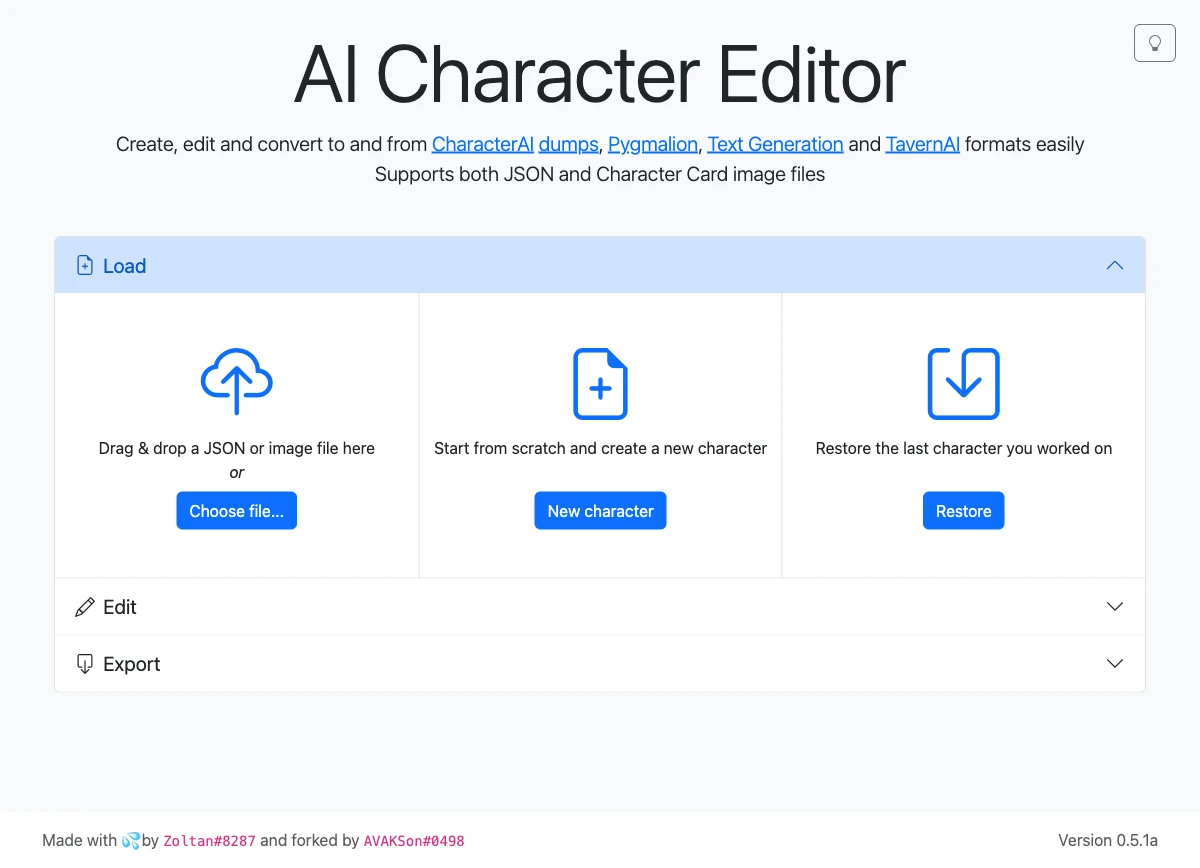
The original editor was built by a developer who went by Zoltan, and for a long stretch it was the character card editor — the one people meant when they said “the editor.” Its disappearance is the kind of quiet death that happens to a lot of these volunteer projects: no announcement, no redirect, just a 404 one day. The community filled the gap itself. A developer named avakson forked the project to avakson.github.io/character-editor, where it still works, and AICharED at desune.moe/aichared has become the maintained successor with real ongoing development. The original's preserved on the Wayback Machine too, if you ever need to see what it looked like.
Want to confirm the timeline yourself? The r/KoboldAI thread on the ZoltanAI downtime is the cleanest community record. According to that thread, people reported that the original host started 404ing in mid-2025, asked what happened, and pointed each other to the live mirrors. So which editor should you actually open? Here are the ones still standing.
Which Character Card Creator Should I Use to Edit an Existing Card?
To edit an existing card, you want a dedicated manual editor — and the ones worth opening in 2026 are the avakson fork of ZoltanAI, AICharED, KoboldAI Lite's card tool, and CCEditor. These are the “you type the fields, you get a clean portable file” tools — the ones that produce a V2 PNG or JSON you can carry into SillyTavern or any other front-end. According to SillyTavern's own documentation, the V2 PNG (with its JSON embedded in the chara chunk) is the shared portable standard every one of these editors is judged against. A character editor in this sense is a workbench, not a chat client. The whole point of opening one is to char edit a card by hand and walk away with a file that loads everywhere. (Want the wider picture of what a card is before you start editing one? Our Character Cards guide lays out the format.)
Here's how we tested them, because this is where the article earns its keep. We built the same character — Mireille Vesper, that Skarnholm lighthouse keeper — in each editor, then exported and inspected the file to see exactly which spec it wrote and which fields it preserved. Same inputs, every tool, so the difference you see in each review is a difference in the tool, not in what we typed. An ai character editor's only as good as the file it writes when you walk away, so that exported file is what we judged.
avakson / ZoltanAI Character Editor — Best for a Clean V2 PNG by Hand
ZoltanAI is the editor everyone means when they say “the character card editor,” which makes it awkward that the original is a 404. When we ran Mireille through the live avakson.github.io/character-editor fork on 2026-06-12, it loaded and ran entirely client-side — nothing uploaded, the whole tool running in the browser tab — and exported both a JSON file and a clean V2 PNG that SillyTavern read without complaint. The original zoltanai.github.io host, tested the same day, returned GitHub's “Site not found” page. The fork is the one that works.
It shows its age in a couple of spots worth knowing. This is an older V2-era editor: it does not support some newer V2 features like multiple opening messages, and it can stumble on spec-3 (V3) cards, sometimes failing to open them correctly. For a plain, portable V2 PNG, though, it is still the closest thing the scene has to a default.
Pros:
- The canonical field-by-field editor — exactly the fields a card needs, nothing extra
- Runs locally in your browser; nothing's uploaded
- Exports both JSON and a clean V2 PNG
Cons:
- The original host is dead — you must use the avakson fork
- Aging V2 support: no multiple opening messages
- Shaky on V3 / spec-3 cards
Key Features: The avakson fork is the closest thing the scene has to a “default” card editor — plain, local, and it still writes a clean V2 PNG.
To maximize your experience: Bookmark the avakson URL, not the zoltanai one — and for multiple opening messages, finish the card in a V2/V3-aware editor like AICharED or CCEditor.
AICharED (desune.moe) — Best for a Card That Loads Everywhere
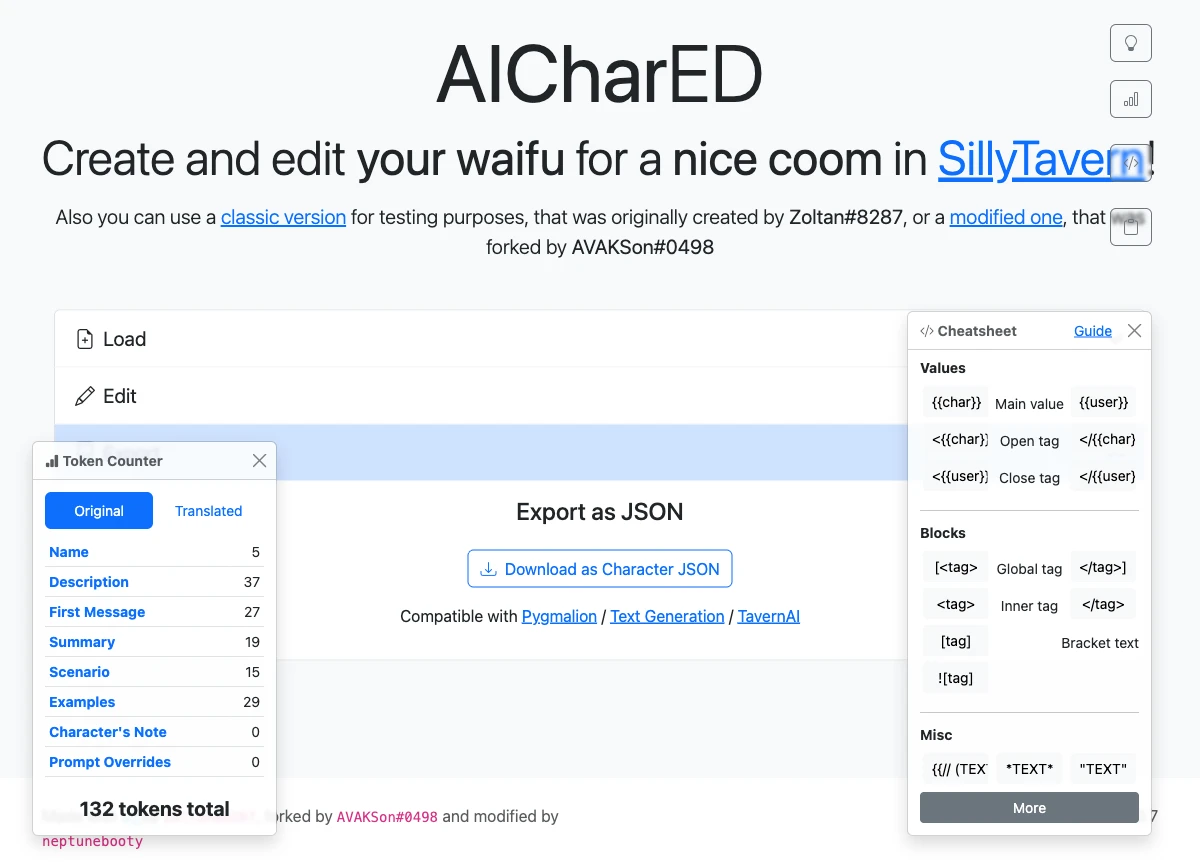
One limitation to flag up front: AICharED's main editor has no dedicated lorebook or World-Info field, so if your character lives on its world-info entries, you will build them elsewhere. Past that, this is the editor we'd hand a nervous first-timer, because its export is quietly the most forgiving on the list. When we exported Mireille from AICharED (v0.7), the card came out in a dual format. It wrote the six legacy flat fields (name, description, personality, scenario, first_mes, mes_example) at the top level of the JSON and a nested data object tagged spec: chara_card_v2, spec_version 2.0. Belt and suspenders. That means the card opens in a ten-year-old V1-only tool and a brand-new V2 tool alike, with no field loss in either — our tags survived the export verbatim.
It also has a genuinely useful live per-field token counter, which matters more than it sounds. Some front-ends silently truncate an over-long definition, and watching the count as you write is how you avoid that. And because it descends from the same lineage as ZoltanAI, it imports Character.AI definition dumps directly, which is the cleanest path off a CAI character and into a portable card. It runs locally in the browser, so your card never leaves your machine.
Pros:
- Belt-and-suspenders dual V1+V2 export loads everywhere
- Live per-field token counter
- Imports Character.AI definitions directly
- Runs locally — your card stays on your machine
Cons:
- No dedicated lorebook field in the main editor
- The UI is utilitarian — function over polish
Key Features: AICharED's quiet superpower is that its export is backward- and forward-compatible at once — write it here, and it opens in the ten-year-old tool and the brand-new one alike.
To maximize your experience: Watch the live token counter as you write the description — if it flags you over budget, trim before you export, because some front-ends silently truncate an over-long definition.
KoboldAI Lite charcard (Broseki) — Best for Lorebooks That Survive Export
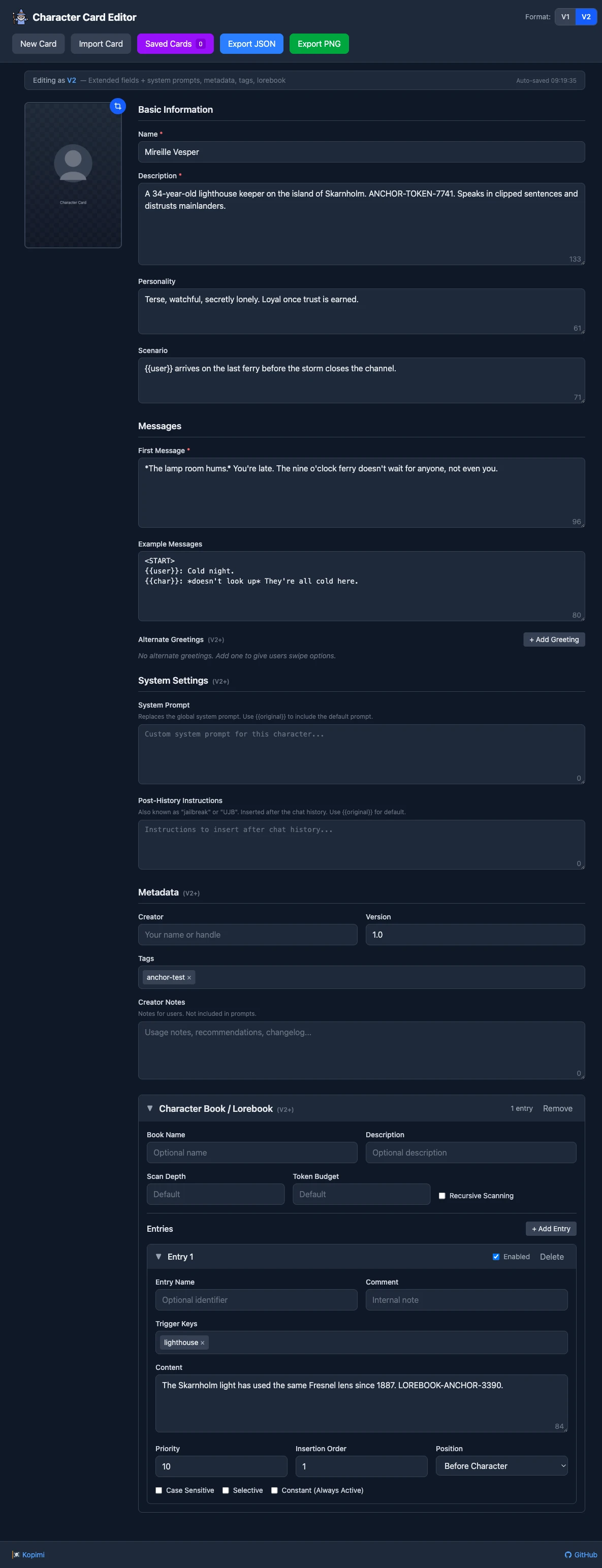
Sometimes the whole character is the lorebook. If that's you, the lite.koboldai.net/charcard editor is the one to build in, because we watched a lorebook actually survive the round-trip here. We built Mireille's world-info entry with the trigger key “lighthouse” and custom content describing her Skarnholm post, exported the card, and reopened the file. The entry came back intact inside data.character_book.entries, keys and content both preserved. No mangling, no dropped fields.
The export itself is a clean, pure-V2 card — spec: chara_card_v2, a data-only structure with no legacy flat fields — and the tool gives you a V1/V2 format toggle, alternate-greeting support, and PNG or JSON export. The trade-off is that pure-V2 cleanliness: with no legacy flat fields, a very old V1-only tool can get confused by it, and the editor naturally wears the KoboldAI front-end's look and feel. (Hunting for cards to edit in the first place? Our Chub guide covers where to find them.) For a lorebook that has to make it out alive, this is the build bench.
Pros:
- Clean pure-V2 export
- The lorebook genuinely survives the round-trip — keys and content intact
- V1/V2 toggle plus alternate greetings
Cons:
- Tied to the KoboldAI front-end's look and feel
- Pure-V2 output (no legacy flat fields) can confuse very old V1-only tools
Key Features: If your character lives or dies on its lorebook, this is the editor to build it in — the world-info entries came back out exactly as they went in.
To maximize your experience: Build your lorebook here even if you finish the card elsewhere — export the V2 PNG with the character_book intact, then import that file into your front-end of choice.
CCEditor (lenML) — Best for a True V3 Card
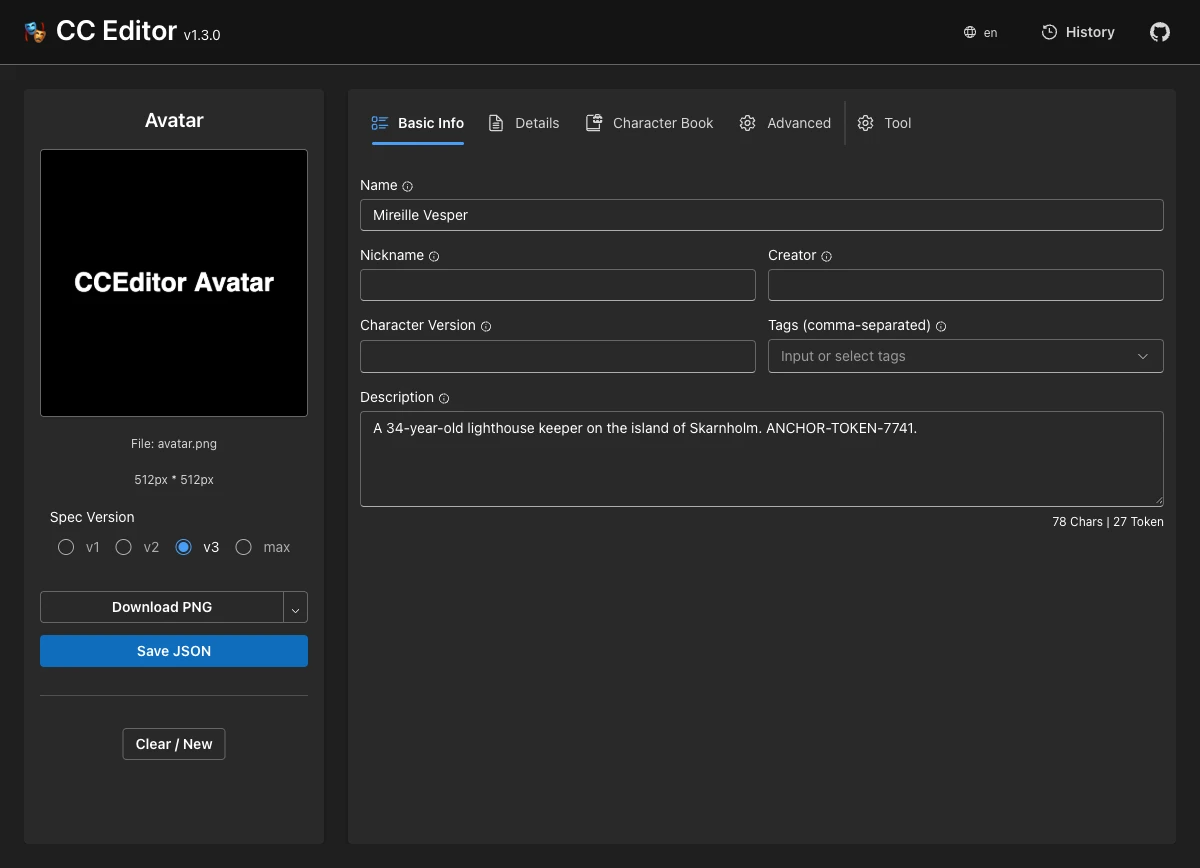
CCEditor is the only editor we tested that actually exports a true V3 card, and that is the whole reason to reach for it. When we exported Mireille from CCEditor (v1.3.0, lenml.github.io/CCEditor), the file came out tagged spec: chara_card_v3, spec_version 3.0, and the data carried the full V3 field set — assets, nickname, creator_notes_multilingual, group_only_greetings, source, creation_date, all of it. Every other editor here tops out at V2. This is the one that writes the modern spec. Its selector lets you choose v1, v2, v3, or “max,” and on import it accepts .png, .webp, .jpg, and .json — the broadest import surface of the three browser editors.
A few honest caveats. V3 is still only “partial” support in some front-ends, and a V3 card can quietly lose fields in RisuAI or Agnai, so you'll want a V2 fallback for daily use. The UI leans developer-ish. And while the tool's alive in 2026, the lenML org repo listing shows that its last update was July 2025, so it is maintained but not weekly-active. As an ai character editor for people who genuinely want V3's extra fields, though, nothing else on this list competes. It's open-source and self-hostable too, which is the right kind of insurance for a format this new.
Pros:
- The only tested editor that writes a true V3 card
- Broadest import surface — .png, .webp, .jpg, and .json
- Open-source and self-hostable
- Spec selector goes all the way down to v1
Cons:
- V3 is still “partial” in some front-ends — keep a V2 fallback
- Developer-leaning UI
- Last commit around mid-2025 — alive, but not weekly-active
Key Features: CCEditor is the one to reach for when you actually want V3 — assets, nicknames, multilingual notes and all — rather than the safe-but-old V2 everything else defaults to.
To maximize your experience: Export V3 for archival and V2 for daily use — drop the spec selector to v2 before sending a card to a front-end that hasn't caught up to V3 yet, so you don't lose fields on the other side.
What's the Best AI Character Card Generator?
The best ai character card generator depends on how much you want to do yourself. Backyard's Triple-C drafts paste-ready text for free, Character Tavern's Card Architect walks you through a guided build, the custom GPT spits out an importable file, and cosmicdrunk's self-hosted generator does the most — fields and art — if you'll bring your own API key. These are the tools where a model drafts the personality, scenario and opening for you, and the only question that matters is whether the output's usable out of the box or needs a heavy rewrite.
One honesty note before we start. Unlike the editors above, we didn't run a hands-on round-trip on these — we assessed each from its stated behavior and sourced facts rather than a build-export-reimport test. cosmicdrunk in particular we did not self-host or run a card through, so that review goes on documented behavior, not a test of our own. And if you'd rather roll your own prompt entirely, the Sphiratrioth666 templates on HuggingFace are a respected DIY method for an ai character chat generator built on top of your own model.
cosmicdrunk SillyTavern Character Generator — Best for Fields + Art in One (Self-Hosted)
We didn't self-host this one or run a card through it, so we're going on the project's documented behavior and its active fork rather than a hands-on test. On paper, though, cosmicdrunk's generator is the most complete of the bunch. It is a self-hosted Node.js web app that AI-writes the character profile (personality, scenario, opening) and generates character art, exports SillyTavern-ready cards, and supports lorebooks. It is the only ai character generator chat tool here that paints the character as well as writing it. The catch is what it asks of you. It's bring-your-own-API-key, model-agnostic across OpenAI and OpenRouter, and it wants a server you run yourself. The live-in-2026 signal is the Zebede fork, CardGenV2, which extends the original with more image-gen control, direct SillyTavern integration, and AI-generated lorebooks. So it's powerful, it's current, and it's the least casual option here — a real install, a real key, a real payoff if you want fields and art from one tool.
Key Features: On paper it's the most complete of the generators — the only one that writes the fields and paints the character — but it asks the most of you: a server and an API key.
To maximize your experience: If you go this route, start from the Zebede CardGenV2 fork rather than the original — it's the actively maintained one, with direct SillyTavern integration and AI-generated lorebooks.
Backyard “Triple-C” — Best for a Free Paste-Ready First Draft
With a name like Triple-C, you would expect a card generator. What you actually get is a very good ghostwriter who hands the draft back for you to file. Triple-C drafts a fixed template — Name, a sample greeting, a short description capped at about ten words, and a long description of up to two paragraphs — as paste-ready text, not an exported file. Backyard's own card page is refreshingly blunt about this: it states straight out that you'll still need to proofread the results and put them into cards yourself, and that it can't seem to handle copyrighted characters. So the honest read is that it does the blank-page part well and leaves the file-building to you. It's genuinely free, which is the main reason it's here, and for a fast first pass at a personality blurb it's hard to beat. Just don't expect a finished card at the end of it.
Pros:
- Genuinely free
- Fast, paste-ready first draft of a personality
Cons:
- Outputs text, not a card file — you finish in an editor
- Won't do copyrighted characters
- The long-description cap is short
Key Features: Triple-C is the fastest way to go from blank page to a usable personality blurb — just don't expect a finished file at the end.
To maximize your experience: Generate the long description, then paste it straight into AICharED or the avakson fork to add the structured fields Triple-C skips — greeting and description alone won't make a complete card.
Character Tavern “The Card Architect” — Best for Guided Hand-Holding
New to all of this and intimidated by a blank card panel? The Card Architect is built for exactly that. It runs a structured, multi-step guided build — there's a “Quickfire Trio” of starter concepts to get you moving and an Expert Mode for example dialogue once you're comfortable — so it asks the questions instead of expecting you to know the fields. The thing to know going in is the model split: the tool's own instructions say that “Iris works best among the free models but it will only do SFW,” and it recommends DeepSeek for the best results and anything NSFW. So the free Iris model's fine for a SFW skeleton, but the depth shows up on the stronger model. It is the friendliest on-ramp here, with a real ceiling on the free tier — worth a look if a blank character panel makes you freeze.
Pros:
- The most beginner-friendly option — it genuinely walks you through it
- Structured multi-step flow with an Expert Mode
- Usable on free models for SFW characters
Cons:
- Free models (Iris) are SFW-only
- Best quality needs the recommended DeepSeek model
Key Features: The Card Architect is the one to start with if a blank card panel intimidates you — it asks the questions so you don't have to know the fields yet.
To maximize your experience: Set max tokens up toward 4k and switch to DeepSeek before the final pass — the free Iris model is fine for a SFW skeleton, but the depth (and anything NSFW) shows up on the stronger model.
AI Character Card Generator GPT — Best for ChatGPT Users Who Want a File
Sometimes you just want the file, and you are already in ChatGPT anyway. This custom GPT is the one casual generator that actually hands you an importable card instead of a wall of text to copy out — it produces a Tavern Spec V2 JSON and auto-encodes it into a PNG for download, so SillyTavern imports it directly with no manual JSON wrangling. It offers a Standard variant (600–1,000 tokens) and a Small one (400–600 tokens), which is a nice touch when you want a main character versus a bit-player. It is login-gated behind a ChatGPT account, and a Plus subscription gets you cleaner output, though it isn't strictly required. We confirmed the file-output pattern via the open analog (cha1latte's sillytavern-character-generator), which mirrors the same Standard/Small variants and PNG-encoding step, rather than from behind the login.
Pros:
- Outputs a directly importable file, not just prose
- Lives where ChatGPT users already are
Cons:
- Login-gated — a ChatGPT account is required
- Quality leans on GPT-4 / Plus
Key Features: Of the casual generators, this is the one that actually hands you a card file instead of a wall of text to copy out.
To maximize your experience: Ask for the Standard (600–1,000 token) variant for a main character and the Small one for a bit-player — then import the PNG straight into SillyTavern without touching the JSON.
How Do I Import a Finished Card into SillyTavern, KoboldAI, or ourdream.ai?
To import a finished card, you point each front-end at the same V2 PNG (or JSON) you exported — here's the click path for the three most common destinations. The file's portable. It's the destination that decides what the card can do once it lands.
SillyTavern
- Open the Characters panel.
- Click Import Character.
- Pick your PNG or JSON file — the embedded definition loads automatically.
(New to SillyTavern itself? Our SillyTavern setup guide walks through the install before you get to the import step.)
KoboldAI Lite
- Hit the Load button.
- Upload the card file.
- The character drops into your session, lorebook and all.
ourdream.ai
- Go to ourdream.ai/character-import.
- Upload the .png or .json.
- It auto-fills appearance and you generate — image, video and chat on that exact character.
That last one is the difference worth naming. SillyTavern and KoboldAI run the card as text, while the ourdream.ai destination is where the card actually comes to life with image and video on top of chat. Want the generated art to match? Our Janitor character-image how-to covers the prompt side.
Is It Ethical to Let AI Write Your Character — and Where Do the Card Formats Go From Here?
There is nothing unethical about letting a model draft your character's first message — but the more interesting question is what happens to all these cards when the tools that made them keep dying. ZoltanAI is the cautionary tale sitting right in the middle of this article: a tool so standard that people used its name as a synonym for the whole category, and one day it just 404'd. No malice, no shutdown notice. A volunteer project that quietly stopped being hosted. The scene survived because forks like avakson and AICharED picked it up, which is a lovely thing and also a fragile one. The continuity of this entire hobby rests on individual maintainers choosing, unpaid, to keep a thing alive.
The format story is the same anxiety in a different shape. We have V1, V2 and V3 cards now, and “supported” turns out to be a spectrum — a V3 card that exports beautifully from CCEditor can lose fields when it lands in a client that only half-implements the spec. So a card isn't quite as portable as the “it's just a PNG” framing suggests. It is portable until the next fork in the spec, and then you're managing fallbacks. None of this is a reason not to make cards. It's a reason to think about which file you're really walking away with.
And then there is the quieter question under the AI-generator tools: if a model wrote the personality, the scenario, and the opening line, is the character still yours? You picked the seed and you'll edit the result, sure — but the words came from somewhere else. There's no clean answer to that, and pretending there is would be its own kind of dishonesty. It's a question worth holding open rather than closing.
FAQ
Is ZoltanAI down, and what's the live version of the ZoltanAI character editor?
→
Yes. The original zoltanai.github.io/character-editor is dead — it returns a "Site not found" 404. Use avakson.github.io/character-editor instead; it’s the working fork and runs entirely in your browser.
What's the difference between a manual card editor and an AI character card generator?
→
It comes down to who writes the fields. A manual editor (like the avakson fork or AICharED) is a workbench where you type the name, description, personality and scenario, then export a clean file. An AI character card generator (like Triple-C or the custom GPT) has a model draft those fields from a short prompt, which you then paste into an editor or import directly. Editors give you control; generators give you a head start.
Which tools export a V2 PNG that SillyTavern can import without mangling the fields?
→
From our round-trip test, three did it cleanly. AICharED writes a dual-format card (flat fields plus a V2 data block) that loads everywhere. KoboldAI Lite’s charcard editor writes a pure-V2 card whose lorebook survived export intact. And the avakson fork writes a plain, reliable V2 PNG. All three re-imported into SillyTavern without dropping fields.
Do I need an OpenAI or OpenRouter API key to use the AI generators?
→
That depends on which one. Backyard’s Triple-C is free and needs no key at all. The custom GPT just needs a ChatGPT login. The Card Architect runs on free models (Iris) for SFW work but recommends DeepSeek for the rest. cosmicdrunk’s self-hosted generator is the one that genuinely requires a bring-your-own API key plus a server to run it on.
Can I import a Character.AI export or definition into a card editor?
→
Yes. AICharED imports Character.AI definition dumps directly — it’s the cleanest path off a CAI character. ourdream.ai also reads Character.AI JSON exports at ourdream.ai/character-import, where the imported character can then generate images and video, not just chat.
Does any tool generate the character's art as well as the card fields?
→
A couple do. cosmicdrunk’s self-hosted generator writes the fields and paints the character in one pass (we are going on its documented behavior, not a hands-on test). And ourdream.ai generates image and video of the exact character you import or build, which is the build-and-run version of the same idea.
I made a card — where can I actually use it (chat + images) without a content filter?
→
Import it at ourdream.ai/character-import. Most front-ends run your card as text only; ourdream.ai reads the same .png or .json and turns it into a character that generates image, video and chat with no NSFW restrictions — the same character you built, now actually moving.
Do these editors run locally, or do they upload my card?
→
The browser editors run locally. The avakson fork and AICharED both run entirely client-side — the page itself says your data isn’t uploaded — so your card never leaves your machine while you edit it. That’s a genuine privacy point if you’re working on something you’d rather not hand to a server.
What's the One Thing Worth Remembering About Character Card Creators?
The character card creator you pick matters less than the file you walk away with — because the file outlives the tool that made it. ZoltanAI proved that the hard way. The editor died, but the cards people built in it didn't, because a V2 PNG is just a portable little container that any other editor can pick up. The tools come and go. The forks rise and fall. What persists is the character you wrote well enough that the next tool can still read it.
So the real skill here isn't mastering any one editor — it's making something that survives the next fork in the format. Build it clean, keep a V2 fallback, and the card will still load long after its birthplace 404s. And to do more than file it away, the same .png you exported can be brought to life with image and video over at ourdream.ai. Tools are temporary. A good character is the thing that lasts.

Related Articles
Browse All →
ourdream vs candy.ai
sweeter than candy?
Read full article →
ourdream vs GirlfriendGPT
Which AI companion actually remembers you?
Read full article →
ourdream vs JuicyChat
Comparing content freedom and image quality.
Read full article →
ourdream vs SpicyChat
How does SpicyChat stack up against ourdream?
Read full article →