

How to Create a Custom AI Character on ourdream.ai
Guides | Updated on August 21, 2026
By Lizzie Od

TL;DR
- You will build a custom AI character with its own persona, look, voice and memory, and it takes only a few minutes.
- The one thing that most improves a character is a specific persona and a clear scenario. A vague character gives you vague replies.
- Start in the ourdream.ai character creator and refine the character from how it actually responds.
A well-built custom character on ourdream.ai remembers what you tell it, keeps a consistent personality, and stays inside the scenario you set, even across a long chat. That is the difference between a character that feels like someone and one that resets every session and answers like a generic bot.
This guide walks through building one on ourdream.ai, step by step, in the real character creator. The steps are quick. The part that matters is the detail you put in, so we cover what makes a character hold together before the walkthrough, then the common mistakes that make one fall apart.
What makes a good roleplay character
Four things carry a good roleplay character across a long session: persona, backstory, scenario and memory.
Persona is who they are: their personality, their voice, the way they speak. A specific persona (“dry, guarded, speaks in short sentences”) produces sharper, more consistent replies than a broad one (“friendly and nice”).
Backstory gives the character a past to draw on. Where they are from, what they want, what they are afraid of. The character references it, so the conversation has something to build on.
Scenario is the world the character lives in and the situation you are both in. It keeps the roleplay anchored instead of drifting, because the character has a place to be and a reason to act.
Memory is what ties it together over time. On ourdream.ai the character keeps an advanced memory of past chats, so details you set, and things that happen in the story, stay consistent as the session runs long.
Get those four right and the steps below take a few minutes.
How to create a custom AI character on ourdream.ai
You build a custom AI character on ourdream.ai by working through the creator's tabs: Style for the art style, General, Face and Body for the look, and Details for who the character actually is. The whole thing takes a few minutes.
1. Open the creator and choose a base
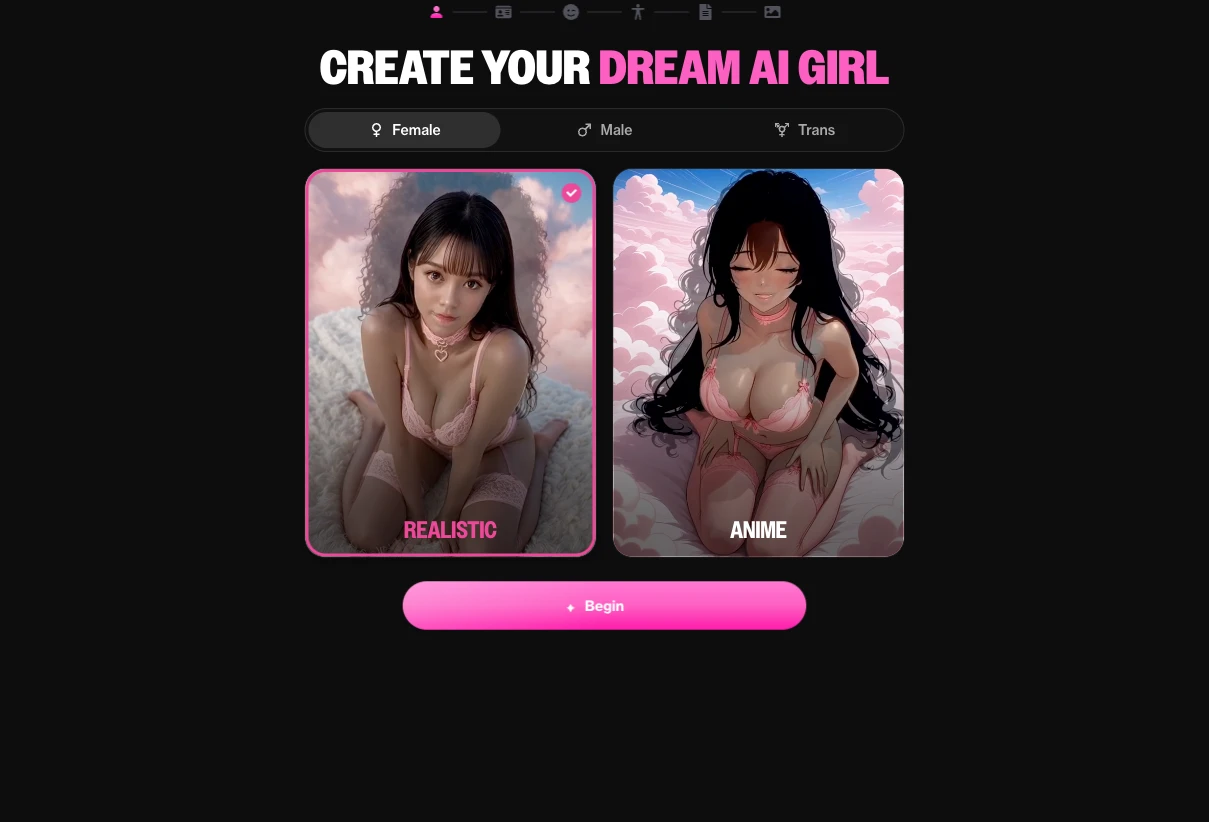
Go to the ourdream.ai character creator and start a new character. The first tab is Style: pick the gender, Female, Male or Trans, then choose the art style you want, Realistic or Anime. This sets the look you will build on.
2. Write the persona
This is the step that decides everything after it. Describe who the character is: their personality, their interests, how they speak and carry themselves. Be specific. “Sarcastic but loyal, talks fast, hates small talk” gives the model far more to work with than “kind and fun”. The persona is what keeps replies in character across the whole session.
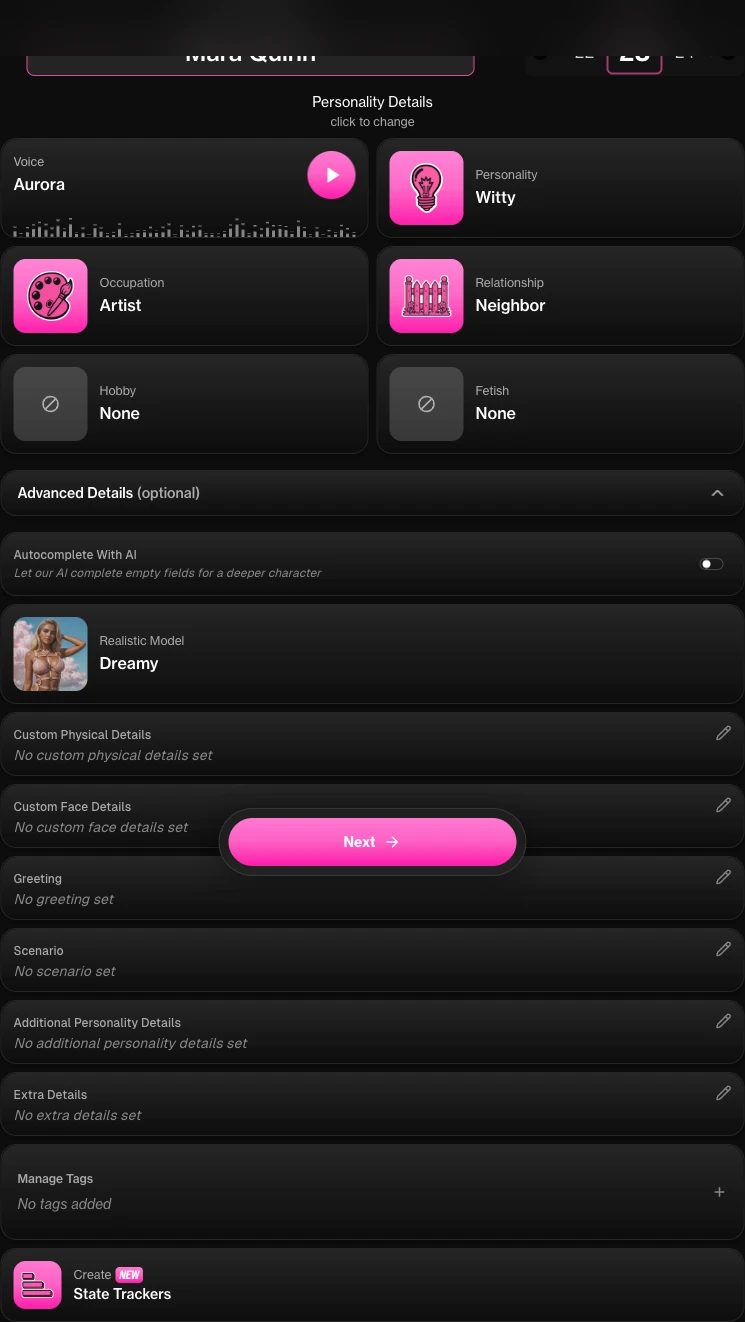
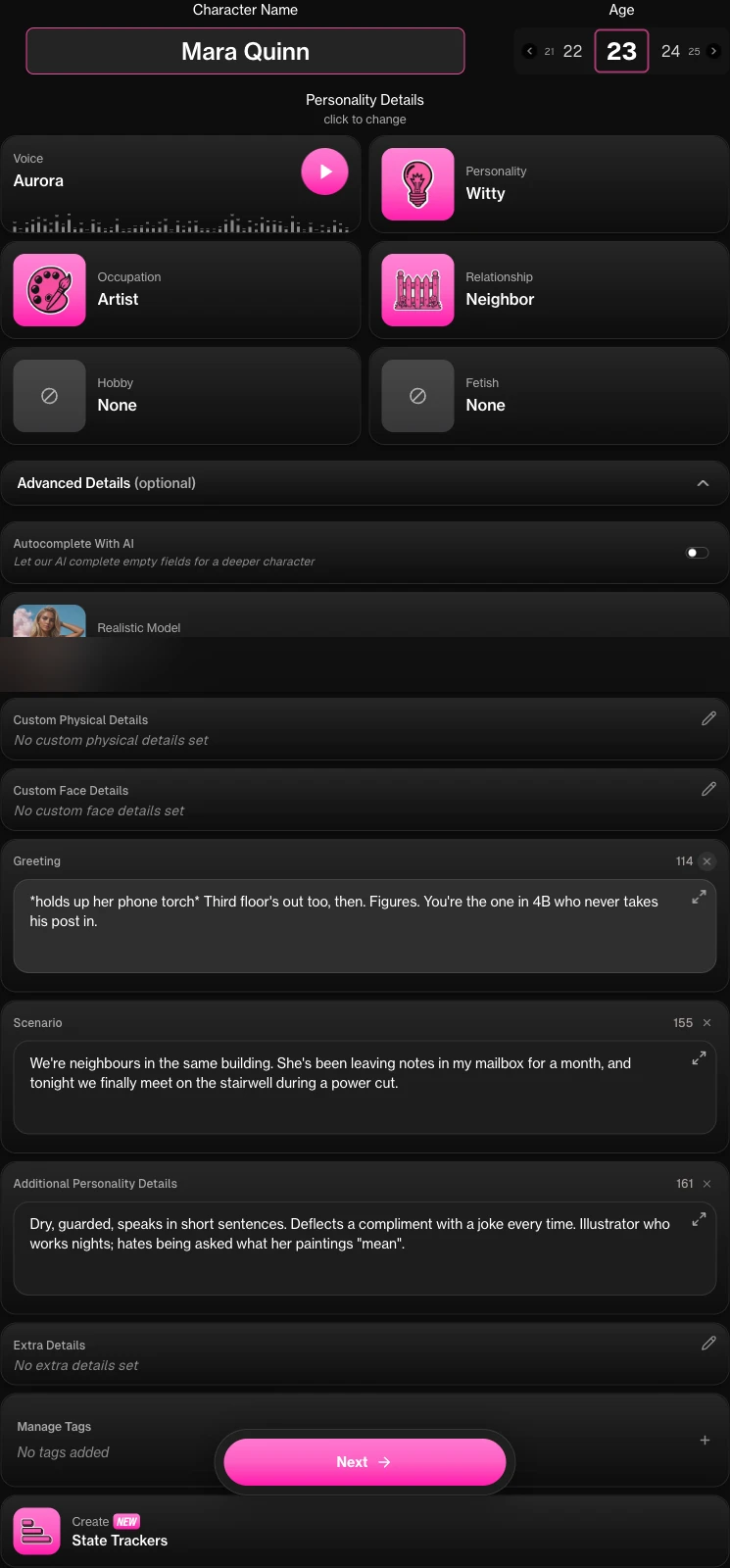
In the builder this lives on the Details tab. You set a Character Name and Age, then six fields: Voice, Personality, Occupation, Relationship, Hobby and Fetish. Personality runs from Flirty and Sweet through Witty, Mysterious, Intellectual, Tsundere and Yandere, and most of these fields have a Custom option. Relationship is the one people skip and should not, because it frames every exchange before a word is spoken.
3. Set the appearance
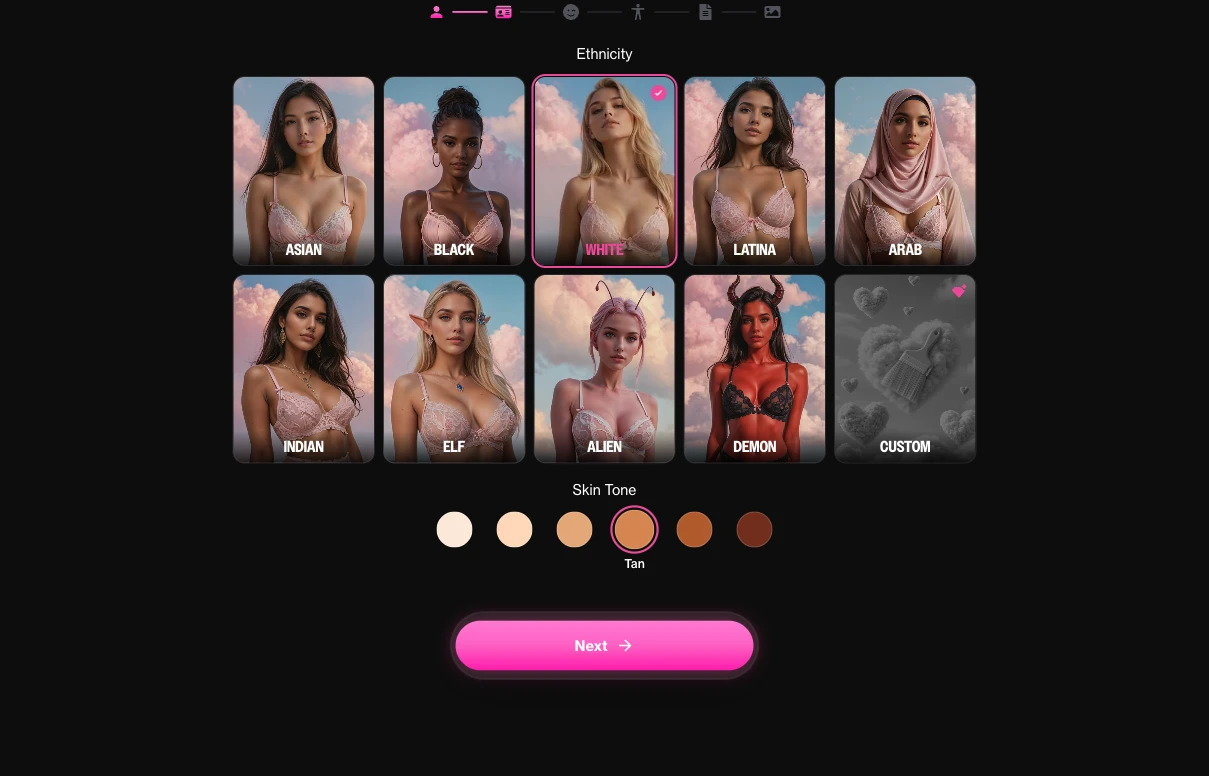
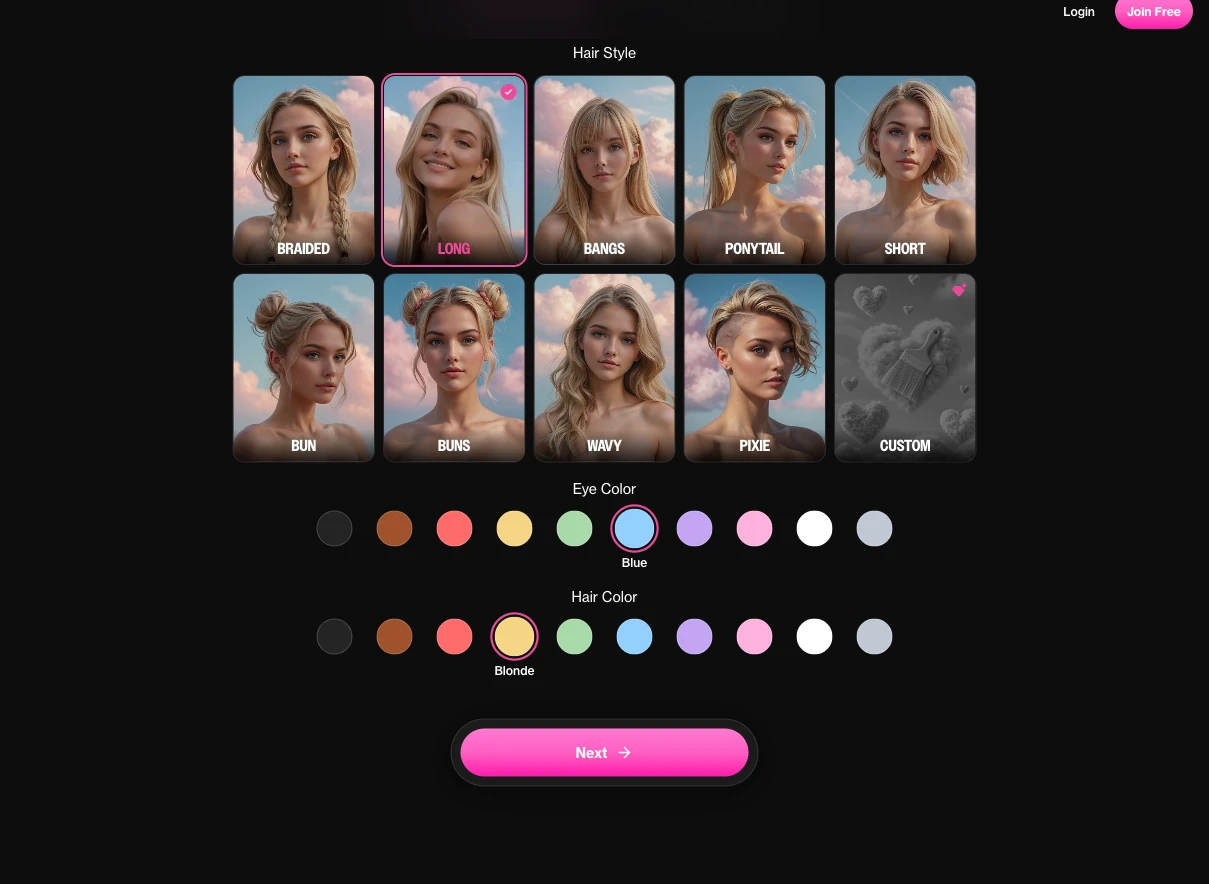
The appearance is split across three tabs. General covers Ethnicity, with Asian, Black, White, Latina, Arab, Indian, Elf, Alien and Demon, plus Skin Tone from Fair through Darker. Face covers Hair Style, Eye Color and Hair Color. Body covers Body Type, Slim through Muscular, and the size controls. This is where the character stops being a template and starts looking like the one you had in mind.
4. Add backstory and scenario
Give the character a past and a present. A short backstory, where they come from, what they want, and a scenario that sets the situation you are both in. This is the world the character stays inside, and it is what stops a long roleplay from wandering off.
These fields sit under Advanced Details (optional), a panel at the bottom of the Details tab that is collapsed by default. Four fields do the work: Greeting, the character's first message, written in their actual voice; Scenario, the situation the two of you are in; Additional Personality Details, free text for the specifics a dropdown cannot hold; and Extra Details for anything else. Optional is misleading here. Leaving this panel closed is the single biggest difference between a thin character and one that holds together.
5. Set memory and scenario details
Fill in the memory or scenario details rather than leaving them blank. The more the character knows about itself and its world at the start, the more consistent it stays as the chat runs long. This is the step people skip, and it is the one that separates a character that remembers from one that forgets.
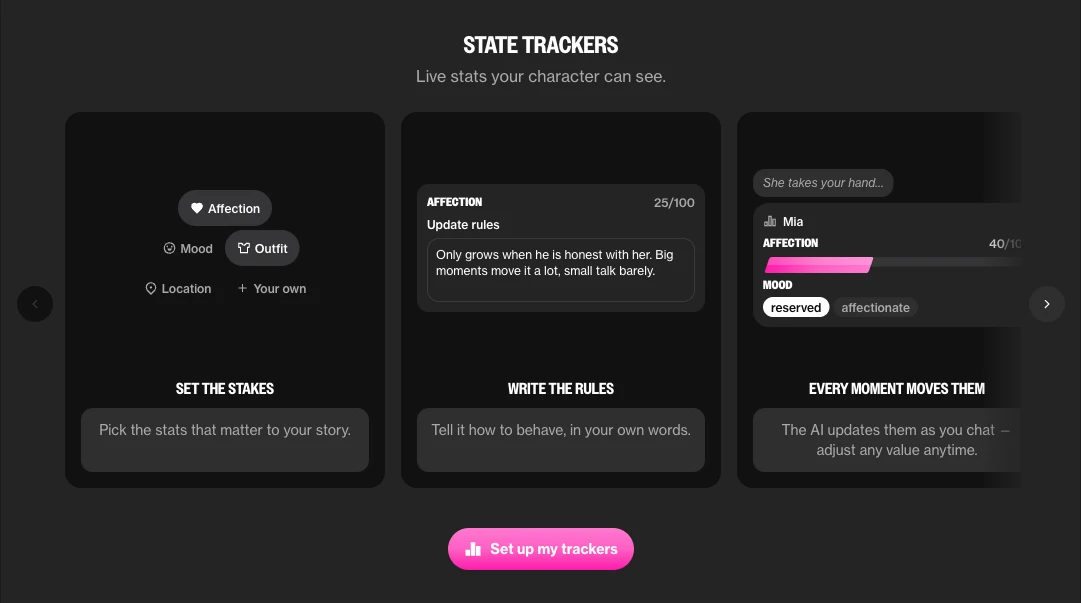
The tool for this is State Trackers, at the bottom of Advanced Details, described in the product as live stats your character can see. You pick the stats that matter to your story, from presets like Affection, Mood, Outfit and Location or ones you define yourself. Each gets a starting value and, more usefully, update rules you write in plain English. The example in the product reads: “Only grows when he is honest with her. Big moments move it a lot, small talk barely.”
That last part is the point. A tracker is not a note you left for yourself; it is state the character reads on every reply. Set an Affection tracker that only rises on honesty, and the character behaves differently at 25 than at 68, without you managing anything.
6. Save, then chat and refine
Save the character on the last tab, which generates it for 5 dreamcoins, then start a chat and see how it actually responds. This is the real test. If a reply feels off, go back and tighten the persona or add a memory detail. A character gets better the moment you refine it from real replies instead of guessing up front, and a free account starts with 55 dreamcoins and room for 10 characters, so there is no reason not to.
Tips for better narrative and persistent memory
Give the character a clear scenario. A character with somewhere to be and something happening around it stays in character far more easily than one floating in an empty room.
Keep the persona specific. Two or three sharp traits beat a long list of soft ones. Specific traits give the model a consistent voice to hold.
Add memory details instead of leaving them blank. Every detail you set at the start is one the character can carry forward, which is what makes a long session feel continuous rather than repetitive. ourdream.ai's memory is not just a claim: in a blind benchmark of five roleplay platforms (Lizzie Od, 2026), it scored highest on recalling a detail introduced about thirty messages earlier, 4.28 out of 5.
Match the voice to the persona and keep it consistent. If your character is guarded and terse, do not write them long, chatty lines in the setup, because that is the pattern the model will copy. The way you describe how they speak becomes the way they speak, so a few sample lines in the character's real voice do more than a paragraph of adjectives.
Think about the difference between a thin character and a built one. A thin character, “a nice person you can talk to”, gives flat, interchangeable replies, because there is nothing to pull from. A built character, “a retired detective who trusts no one, speaks in clipped sentences, and is hiding why they left the force”, gives you replies with an edge, callbacks to its backstory, and a personality that holds up over many turns. Same few minutes of setup. A completely different roleplay.
Common mistakes
The most common mistakes are a vague persona, no scenario, and an over-long bio.
A vague persona. “Friendly and helpful” is not a character. Give two or three specific traits and a way of speaking.
No scenario. Without a situation to be in, the character drifts and the story goes nowhere. Set a scene, even a simple one.
An over-long bio. Pages of backstory dilute the character as much as too little. The model has more to juggle and less of it lands. Keep it tight and specific, and let the rest come out in the chat.
Fix those three and most weak characters turn sharp. If you would rather see the idea in action first, the ai sex chat roleplay guide covers how a built character behaves once the scene is running.
FAQ
Can I make my own AI character?
→
Yes. On ourdream.ai you build a character from scratch: its persona, appearance, voice, backstory and scenario. You start in the creator, set those details, then chat with the character and refine it.
How do I create a custom AI character on ourdream.ai?
→
Open the ourdream.ai creator, choose a base and art style, write the persona, set the appearance, add a backstory and scenario, fill in the memory details, then save and start chatting. Refine the character from how it responds.
How do I give an AI character memory?
→
Fill in the memory or scenario details when you build the character, rather than leaving them blank. ourdream.ai keeps an advanced memory of past chats, so the details you set and the things that happen in the story carry forward and keep the character consistent.
What makes a good AI roleplay character?
→
A specific persona, a backstory the character can draw on, a clear scenario to stay inside, and memory details set from the start. Specific beats broad every time. A sharp, narrow character holds up over a long session where a vague one falls flat.
Can I create an AI character for free?
→
You can create an account on ourdream.ai for free and start building. A paid plan adds unlimited messaging for long sessions. Check the current plan details on the site for what each tier includes.
How do I make my AI character stay in character?
→
Give it a specific persona and a clear scenario, and set memory details at the start. The tighter the setup, the more consistent the character. If it drifts, go back and sharpen the persona or add a detail it can hold on to.
Can I edit an AI character after I create it?
→
Yes. Refining is part of the process. After you chat and see how the character responds, go back and adjust the persona, appearance or memory details, then keep going. The best characters are the ones you tune from real replies.
Start building
A good custom character takes a few minutes to set up and pays off across every chat after that. Give it a specific persona, a clear scenario and real memory details, and it will remember you and stay in character as the session runs long.

Related Articles
Browse All →.webp)
Character AI vs OurDream: Uncensored in 2026?
Leaving Character AI's filter? Character AI vs OurDream on content freedom, memory and message limits, with an honest side-by-side.
Read full article →

Janitor AI vs OurDream: No API Keys (2026)
Janitor AI vs OurDream: no API keys, no proxy setup, built-in image generation, uncensored. See which is easier and where each wins.
Read full article →

SpicyChat vs OurDream: Memory & Media (2026)
SpicyChat vs OurDream on memory, image and video, and message limits. We tested both. See which remembers your story and where each wins.
Read full article →

Chai vs OurDream: Real Adult Content? (2026)
Chai vs OurDream on adult content, realism and memory. We tested both. See which delivers genuine uncensored chat and where each wins.
Read full article →

Candy AI vs OurDream (2026): Which Is Worth It?
An honest comparison of memory, images, video and real cost.
Read full article →
ourdream.ai vs Character AI
An honest side-by-side on filter, memory, message limits and price, dated August 2026.
Read full article →